StarBand
© Brooke Clarke 2007 - 2023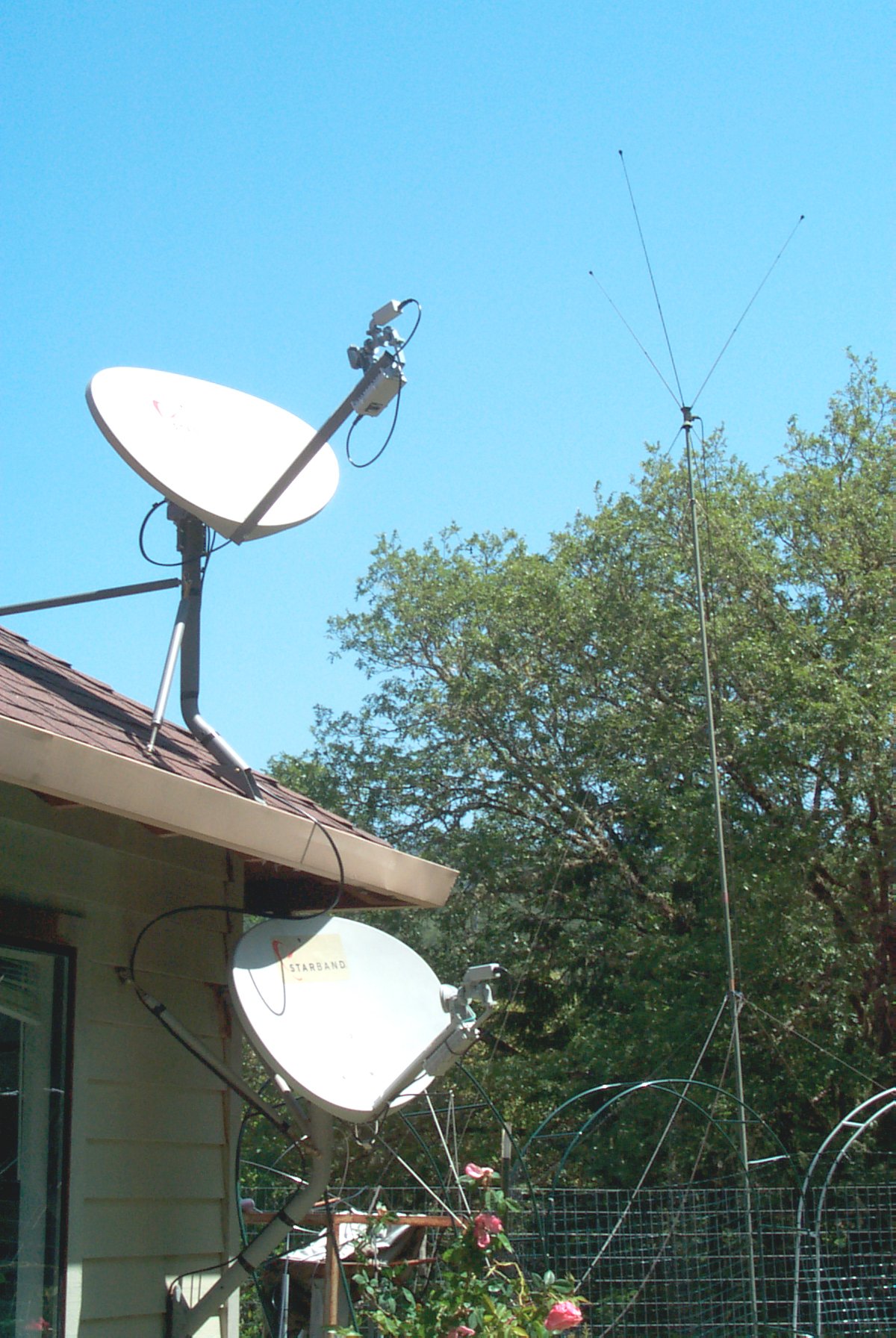
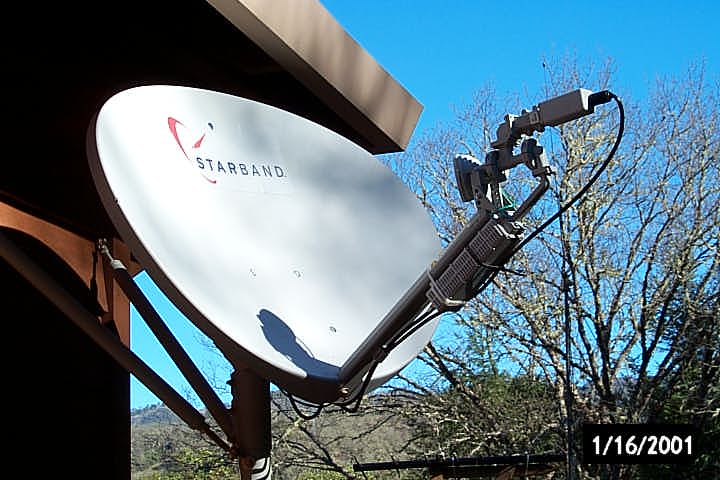
New Nova Starband antenna above now obsolete better 360 antenna.
OE-254 antenna in background
Background
Gilat (Wiki) pioneered in the Very-Small-Aperture Terminal (Wiki: VSAT) business. The story I heard was gas stations in rural areas were early adopters since this allowed them to offer Pay At the Pump (Wiki) service which requires an internet connection.
The first system I had used a fairly large indoor box that covered over a square foot of desk space (maybe two?) marked Gilat "180" and maybe in 2005 when Gilat acquired Starband (Wiki) I got a new indoor "360" box that was much smaller and stands up so does not take up much desk space.
Problems
Because this system uses a geostationary satellite the ping time is close to a second. So every back and forth transaction requires almost a second the time to load a web page rich in graphics is forever. This also means that this system is not suitable for VOIP phone use.
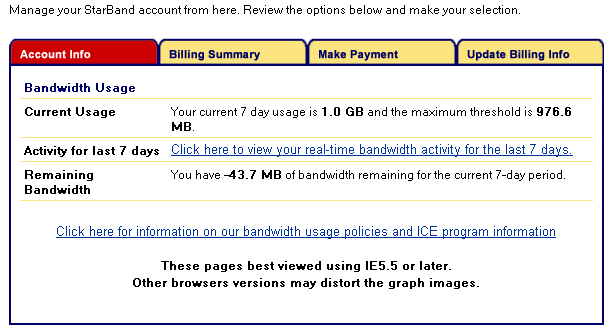
Unknown to me Starlink employed throttling (Wiki) if you used to much data. At that time I was using it for web page creation and maintenance, not for watching video, yet I was throttled and it took some time to troubleshoot what was going on.
Because rain attenuates a Ku band signal, when there is bad weather in Georgia, where the single ground station was located, I had poor service.
The path of the sun in the sky crosses the geostationary orbit a couple of times a year. While there's nothing you can do to mitigate the outage, making a ceiling Sun dial and marking the outage is a easy way to know when it happens.
2023 update: I have my VOIP phone on the DSL phone line since AT&T keeps that line working, even when there's a power outage. But I'm now using Starlink for my main internet connection.
1 Sep 2010
Canceled service - moved to "Basic DSL". Although the DSL
download
speed is 600 k bits/sec compared to the Starbnad "1500
service" speed
that peaks at 2,400 k bits/sec and sustains 1,500 bits/sec the
DSL ping
time of 100 ms is much faster than the Starband (or any
satellite based
service) ping time of 800+ ms.
20 Aug 2010
at&t finally got the DSL to
work. The problem seems to have been a trunk connection
between
the DSL box and the crossover box at the foot of my
street. 608 k
bits/sec is about half the speed of the Starband 1500
service.
at&t is $15/month, Starband 1500 is $100/month.
at&t ping time is about 100 ms compared to Starband 800+ ms.
at&t ping time is about 100 ms compared to Starband 800+ ms.
Web pages load noticeably
faster.
25 June 2010
Swapped the dish, arm and feed
horns of
the old (bottom unit in photo above) and new (on roof in photo
above).
Prior to the swap the Rx signal was 6.9 and after the swap it was 8.9! This was done by removing the arms from both dishes and swapping the Tx and Rx units (leaving the feed on the arms then removing the dishs from the mounts and swapping them.
The Nova dish has a longer arm (31.5") than the older better 360 dish arm (19.5").
Prior to the swap the Rx signal was 6.9 and after the swap it was 8.9! This was done by removing the arms from both dishes and swapping the Tx and Rx units (leaving the feed on the arms then removing the dishs from the mounts and swapping them.
The Nova dish has a longer arm (31.5") than the older better 360 dish arm (19.5").
Starband Nova Antenna Arm
(temperature sensitive)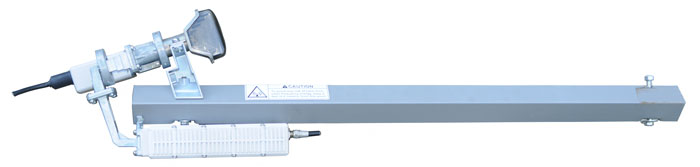 |
|
Starband 360 Antenna (25
June
2010) replaces Nova Antenna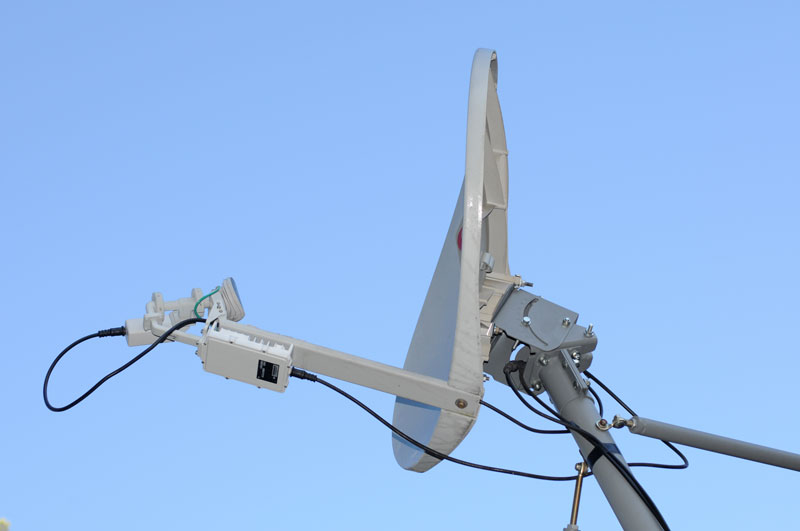 |
16 June 2010
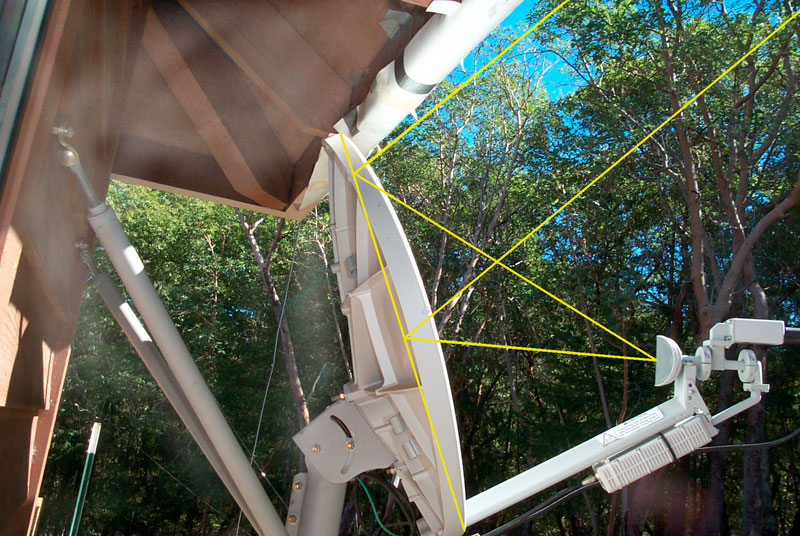
By using a green laser pointer
aligned
with the support arm I could see that there were tree tops in
the beam
(assuming that the beam points along the line of the support
arm,
anyway that's what Starband told me. After using the
laser
pointer to identify the tree that was the most in the beam and
cutting
it down, the next day the laser pointer showed another tree
also in the
beam. On 18 June there are not trees in the beam, but
are just
below it. The Rx signal EbN0 is in the sixes. It's
hard to
tell if this was the cold problem until next winter.
22 May 2010
48.7 deg F outside and s/n 5.51
i.e.
system on the ragged edge of working.
12 May 2010
I received an email from Eric
who told
me of the problem of warped
dishes (he has the reinforced plastic dish like mine, not a
metal FTA type dish). As the
temperature gets
colder they can distort lowering
the signal strength. Now to come up with a way to test
for
this.
This makes more sense since it's hard cold would effect other
problems
like water, i.e. water is a disaster when liquid and the
temperature
may not be cold enough to freeze it.
28 April 2010
This has been the wettest winter
in
about a decade and StarBand does not work in the rain (either
at the
base station in Georgia, or my location in N.
California). So
ofter, like right now, I'm using a dial up modem to connect to
the
internet. Still have not taken apart the microwave parts
to
clean, dry and reassemble them using Silicon grease to make
sure all
the joints are water vapor tight. That needs to be done
when it's
dry outside.
24 March 2010
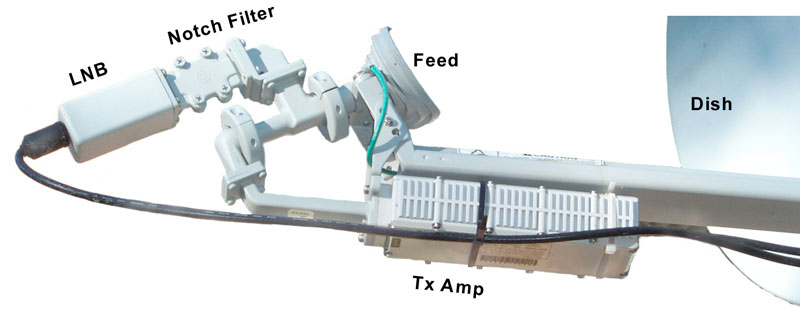
Inside a Gilat (Starband) LNB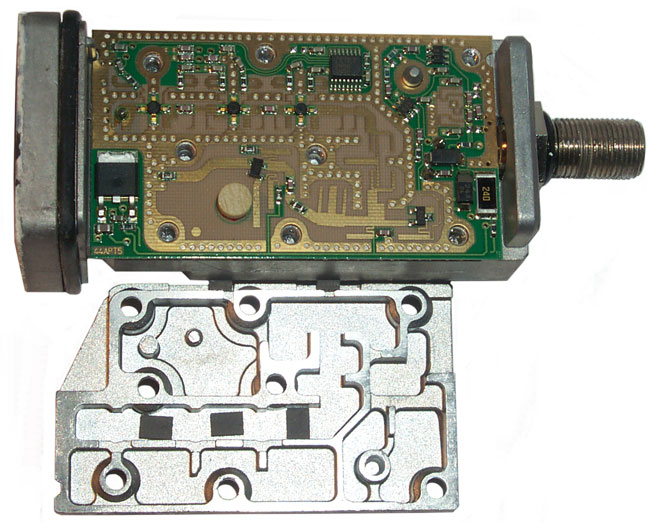
The input is at the upper left, followed by three stages of amplification that includes some band pass filtering.
The white disk in the lower left is the dielectric for the local oscillator which is tuned by the metal screw in the lid.
After the three stages of amplification there's a band pass filter and following the LO there's also a filter. The IF output is fed to the type F connector on the right which is also the 24 VDC input. There's no heater.
14 March 2010
http://www.broadband.gov
FCC broadband internet access on line test.
My test resutls with the 1500 service (best of the Starband offerings)
* this is the problem that really slows things down and makes
VOIP
impossible.
My test resutls with the 1500 service (best of the Starband offerings)
| Test | Result |
| Download Speed |
1538 k bits/sec |
| Upload Speed |
105 k bits/sec |
| Latency |
293 ms * |
| Jitter |
345 ms * |
13 March 2010
Most of this morning with a
clear sky,
it was near freezing outside and the Rx signal
EbN0 was about 3.47 around noon, i.e. no internet
connection. So,
swapped the
LNB from the old (wall) system and the active (roof)
system. The
system works after the LNB swap.
| Time | Rx signal EbN0 | deg F |
| 13:07 |
7.64 |
|
| 13:28 |
6.77 |
|
| 14:02 |
6.68 |
|
| 15:40 |
7.02 |
|
| 16:00 |
6.64 |
|
| 18:00 |
6.48 |
|
| 18:25 |
6.38 |
|
| 19:00 |
6.45 |
|
| 21:00 |
6.25 |
38.5 |
| 22:00 |
6.37 |
37.8 |
| 05:37 |
5.55 |
33.6 |
| 06:38 |
5.65 |
33.1 |
| 07:30 |
5.55 |
33.3 |
| 08:00 |
5.64 |
34.0 |
| 09:00 |
6.12 |
37.0 |
| 10:00 |
6.60 |
39.9 |
| 11:00 |
7.76 |
45.3 |
| 12:00 |
7.93 |
68.0 |
| 13:00 |
7.91 |
68.4 |
| 14:00 |
7.50 |
59.3 |
| 15:00 |
6.83 |
66.7 |
| 16:40 |
7.20 |
64.4 |
| 17:35 |
7.02 |
58.6 |
| 18:00 |
6.56 |
56.7 |
| 20:00 |
6.31 |
48.6 |
| 23:00 |
6.31 |
42.3 |
| 07:14 |
6.04 |
36.9 |
| 12:14 |
8.06 |
70.2 |
It looks like a heater would
greatly
improve the signal strength. Starband does not know
about a
heater or radome, but suggested that there may be some small
item
trapped in the waveguide plumbing.
12 Mar 2010
The problem may relate to a
degrading
LNB. Here are some Rx signal EbN0 readings from
SkyManage:
As the outside temperature gets colder the LNB seems to be
degrading. Note the pointing is good (i.e. signal is
8.32 at 11
am).
| Time |
Rx signal EbN0 |
| 06:30 |
6.44 |
| 07:00 |
6.50 |
| 07:40 |
6.88 |
| 08:00 |
7.00 |
| 09:23 |
7.02 |
| 09:51 |
7.90 |
| 10:30 |
8.21 |
| 11:00 |
8.32 |
| 12:19 |
8.04 |
| 15:30 |
7.20 |
| 16:30 |
7.28 |
| 23:04 |
6.91 |
| 07:22 |
5.42 |
10 March 2010
Frost on roof and ice in
gutters.
System off since 3 am. Back on at 8:30 am not shure
why.
Drying feed with towel did not fix it. Heating with hair
dryer
did not fix it. Strange. After an hour or so the
signal
came up and the system started to work again.
20 Feb 2010
Repointed to new sat. But
problems with
browser not showing all of page. Fixed early March by
Starband
changing a setting.
Sky Manage /Status shows HTTP Acceleration as OFF.
Sky Manage /Status shows HTTP Acceleration as OFF.
Jan 27 2010 -
Need to get the antenna
repointed
to a new satellite prior to 1 March 2010
Sat Finder - device to aid in pointing dish. Designed for 13 - 18 VDC using a 10 volt Zener diode and pass SOT-23 transistor, but should work OK with the 24 VDC Starband Ku band receiver.

Sat Finder - device to aid in pointing dish. Designed for 13 - 18 VDC using a 10 volt Zener diode and pass SOT-23 transistor, but should work OK with the 24 VDC Starband Ku band receiver.
16 Dec 2009
I've received two letters via
USPS
about getting my antenna repointed to a different satellite
before 1
Feb 2010, but so far
have not been scheduled.
Got this error message today:
Cycling power on the Sky Edge modem fixes the problem.
There are faster satellite services offered by the parent company of Starband, called Spacenet.
There are two broad classes: a dedicated channel all to yourself called thier "Performance" series, very expensive. The "Broadband" series is a shared channel and is considerable lower in cost, but still many time more expensive than the top of the line Starband 1500 service. They claim download speeds in the 1024 or 2048 k BYTES/sec range. The Starband 1500 service is 150 k BYTES/sec (i.e. 1500 bits/sec)
Got this error message today:
| Access Denied
(license_expired) |
| A license has expired on the Proxy, and your request is not permitted: "The SGOS license has expired" |
| A new license must be obtained. |
| For assistance, contact your network support team. |
There are faster satellite services offered by the parent company of Starband, called Spacenet.
There are two broad classes: a dedicated channel all to yourself called thier "Performance" series, very expensive. The "Broadband" series is a shared channel and is considerable lower in cost, but still many time more expensive than the top of the line Starband 1500 service. They claim download speeds in the 1024 or 2048 k BYTES/sec range. The Starband 1500 service is 150 k BYTES/sec (i.e. 1500 bits/sec)
17 Oct 2008
This problem has been with the
Nova for
almost a year that I know of, see:
Red Xs on Page below.
Network Error (dns_server_failure)
This error seems to be caused by a memory leak in the Nova
operating
system. The fix is to power down (unplug the power
supply from
the box) for about 10 seconds then reboot. Note this can
be done
without doing anything to the PC, unlike the 360 that required
software
istalled on the PC. So after the Nova reboots you can
just
refresh the browser windows showing the Network Error
(dns_server_failure) and they will then load properly.
Red Xs on Page below.
Network Error (dns_server_failure)
| Your request could not be processed because an error occurred contacting the DNS server. |
| The DNS server may be temporarily unavailable, or there could be a network problem. |
| For assistance, contact your network support team. |
20 March 2008
The error message when trying to
get to
a web page is something like "Server is Refusing
Connection". In this case the "server" is the
Starband
modem since it has been set as the proxy. See the 14
March 2008
info on how that was done. This seems a confirmation
that the
Nova box has a memory leak since unplugging it for 10 seconds
fixes the
problem.
3 Apr 2008 - In addition to the Network settings below you need to add exceptions to access the router and to access SkyManage so their address' as 4 octal digits need to be added.
3 Apr 2008 - In addition to the Network settings below you need to add exceptions to access the router and to access SkyManage so their address' as 4 octal digits need to be added.
14 March 2008 Red Box instead of Photograph Problem aka
Setting
Proxy Server in Browser
As long as I've had the Nova
this
problem has occurred. The fix has been to unplug the
power to the
Nova for 10 seconds and then it's good for some number of
days, sooner
with heavier usage. Today Mario at Starband support
suggested:
1) Run - cmd <OK>
in DOS window enter ipconfig
write down the default gateway address
2) Windows - Tools - Internet Options - Connections - Lan Settings -
check the third box down "Use a proxy server for your LAN (These settings will not apply to dial-up or VPN connections).
Advanced -
Enter the gateway address into the HTTP: box and the Port box should be 9877 (default)
copy the above into the Secure: boxes
OK all the way out and close Windows.
Reopen Windows and check to see that the above settings are still there.
Only time will tell.
1) Run - cmd <OK>
in DOS window enter ipconfig
write down the default gateway address
2) Windows - Tools - Internet Options - Connections - Lan Settings -
check the third box down "Use a proxy server for your LAN (These settings will not apply to dial-up or VPN connections).
Advanced -
Enter the gateway address into the HTTP: box and the Port box should be 9877 (default)
copy the above into the Secure: boxes
OK all the way out and close Windows.
Reopen Windows and check to see that the above settings are still there.
Only time will tell.
7 March 2008 Solar Outage
The signal gets weaker for more than 10 minutes either side of the most severe outage.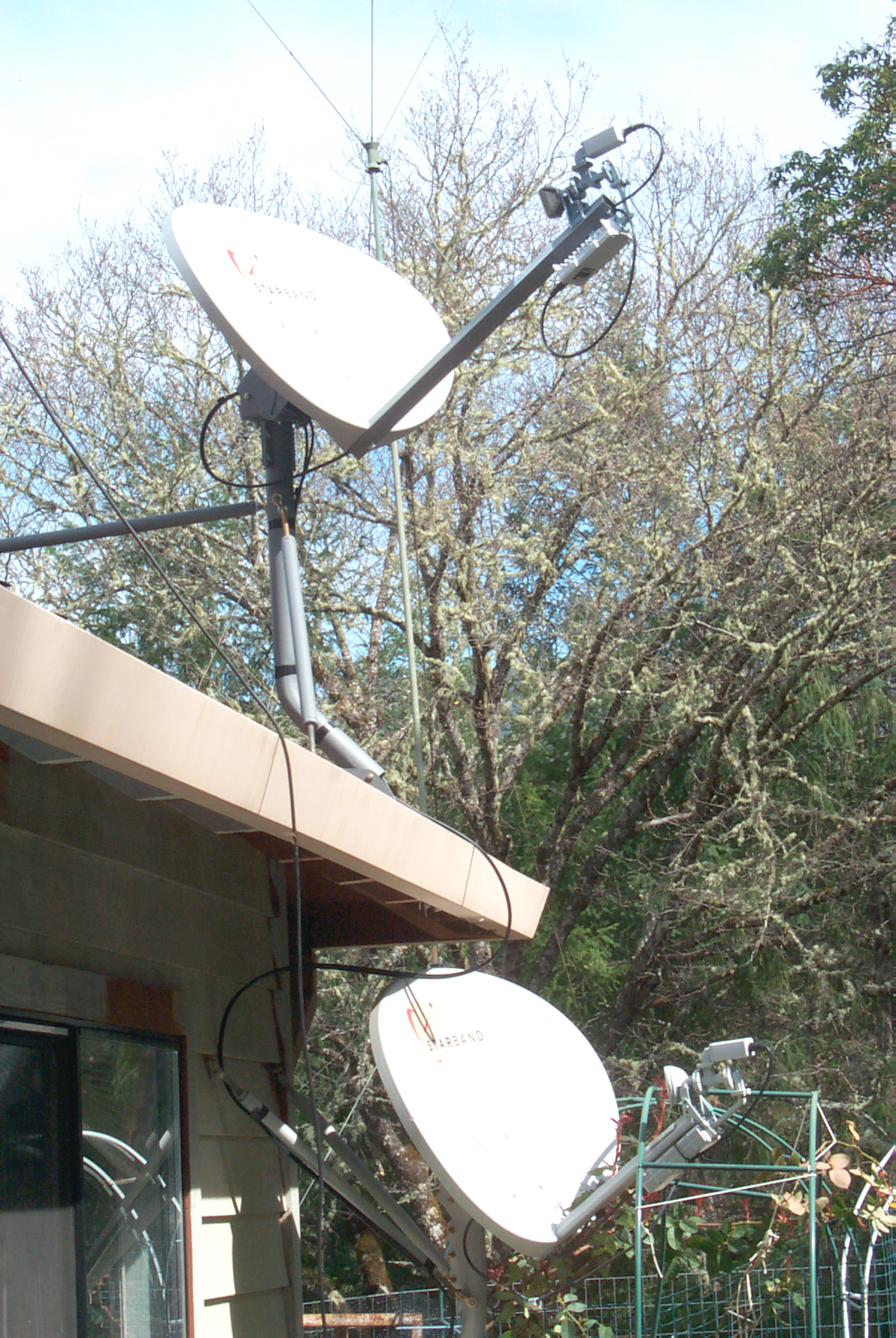

6 Mar 2008 Solar Outage
Cloudy so ceiling sun dial not working. Tried and failed to send email. Then noticed the time was 12:51 and checking the signal strength showed none. Within a couple of minutes it was back.I has hoping that the Nova antenna now on top of the roof (see photo above) would work much better than the old antenna that was aimed at the metal rain gutter, but for Solar outages they are about the same. Taking a photo of the two dishes would be interesting is done at the center of an outage. The suns shadow on a dish would mean a lot of signal blockage, but no shadow would not mean a clear view because of the offset type feed.
5 March 2008 Solar Outage
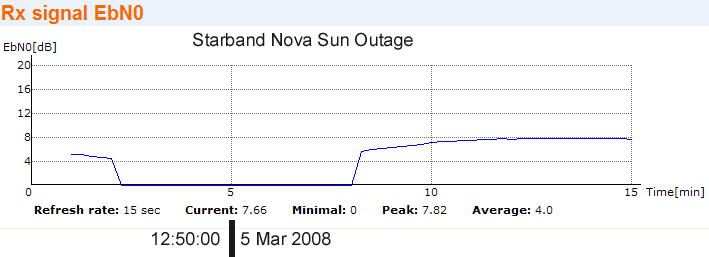
4 March 2008 Solar Outage
My celing sundial
mark for the 360 system is showing an outage now and the Nova
has no
signal.
Based on the outage area 12:50 am is about the center of today's outage.

Based on the outage area 12:50 am is about the center of today's outage.
| Time |
Signal |
| 12:49 |
0 |
| 12:54 |
7 |
| 12:55 |
7.5 |
| 12:56:00 |
7.64 |
| 12:57:00 |
7.76 |
| 1:00:00 |
7.76 |
18 Feb 2008 - Upgraded to the highest level service
For a number of years Starband
has not
been taking new orders for the older 180, 360 and 400 series
modems. The new modem called the Nova has replaced them.
The Nova can run at different speeds controlled by what firmware is loaded. The "Pro" entry level service I started with provides a download speed that's controlled to be about 500 k bits/sec or 50 kBytes/sec. The upgrade speeds are 100 kBytes/sec and 150 kBytes/sec. Along with the faster download speed comes faster upload speeds and a higher bandwidth allocation. My "Pro" allocation was 1 GByte/7 days and that's now 4 GB/7 days. The one thing that does not improve is the ping time which is limited by physics and the speed of light. So altough web page load times are noticably faster they still are not whay you see on a DSL, or Cable Modem connection.
The Nova can run at different speeds controlled by what firmware is loaded. The "Pro" entry level service I started with provides a download speed that's controlled to be about 500 k bits/sec or 50 kBytes/sec. The upgrade speeds are 100 kBytes/sec and 150 kBytes/sec. Along with the faster download speed comes faster upload speeds and a higher bandwidth allocation. My "Pro" allocation was 1 GByte/7 days and that's now 4 GB/7 days. The one thing that does not improve is the ping time which is limited by physics and the speed of light. So altough web page load times are noticably faster they still are not whay you see on a DSL, or Cable Modem connection.
Red Xs on Page
When viewing a web page, like an
eBay
auction page, I was seeing a number of red X marks where an
image
should be, like in the photos section. I think this is
caused by
a bug in the Nova software that's related to memory
allocation.
The fix is to power down the Nova for 15 seconds, you can
leave your
computer and browser windows open, and then let it
reboot. This
zeros the RAM in the Nova and for me fixed the problem. 28 Oct
2007 -
need to see when this is needed again.
30 Oct 2007 - an eBay acution with 12 photos showed 8 X instead. Pressing the browser refresh button did not help. After power cycling the Nova and prseeing refresh all photos were visible.
30 Oct 2007 - an eBay acution with 12 photos showed 8 X instead. Pressing the browser refresh button did not help. After power cycling the Nova and prseeing refresh all photos were visible.
Router

Starband Nova and Linksys
WRT350 Router
In order to share the service
I've
added a Linksys WRT350N Router and a WUSB300N which is a USB
device for
the upstairs computer. The router includes a 4 port hub
so you
can use CAT5 (or better CAT6) to wire up local
computers. The
installation software that comes with the router handles all
of the
configuration. It's very close to plug and play.
They have fixed the usage graph.Note 1:
The cable between the Starband Nova and your computer is a crossover cable (that way you don't need a hub when connecting the Nova directly to a computer). So the crossover cable needs to always be connected to the Nova and when a router is used the crossover cable goes between the Nova and router. Then a standard CAT6 cable connects the router and your computer.
Note 2:
After awhile the performance seemed to degrade. Starband recomended periodic resetting of the router using the following procedure:
Note 3:
If you have just a Nova connected to your PC you can reset the Nova by just powering it off (leave the computer on and leave your browser open), wait 15 seconds then power the Nova back on. If there's a software update this will allow force it to load, but more important it cleans up the memory and DNS routing table in the Nova.
The cable between the Starband Nova and your computer is a crossover cable (that way you don't need a hub when connecting the Nova directly to a computer). So the crossover cable needs to always be connected to the Nova and when a router is used the crossover cable goes between the Nova and router. Then a standard CAT6 cable connects the router and your computer.
Note 2:
After awhile the performance seemed to degrade. Starband recomended periodic resetting of the router using the following procedure:
- power off the PC, router and modem. (PS. CAT6 cables
are not
designed for hot plugging so it's best to power down
equipment before
changing them).
- power on the modem and wait for 4 solid on LEDs
- power on the router\
- power on the computer
Note 3:
If you have just a Nova connected to your PC you can reset the Nova by just powering it off (leave the computer on and leave your browser open), wait 15 seconds then power the Nova back on. If there's a software update this will allow force it to load, but more important it cleans up the memory and DNS routing table in the Nova.