Printing USPS Postage Stamps
© Brooke Clarke May 2007 - 2012
Background
New Developments
First Class Labels with Postage
International First Class
Label with Postage & Customs Form
What can be Printed
Mailing Systems
Advantages of Printing your Own Postage
USPS Rules
Vendors
Pitney Bowes
Stamps.com
Dymo
Endicia
USPS Click-N-Ship
DVD CD-ROM Mailers
13 oz Rule
Flat Rate Boxes
- Table
Service Center with
Scales & postage printer
Fedex Smart Post (Really Dumb Post)
Pricing
Printer
Ink
Blank Stamps
Monthly Fee
Comparison - Table
Conclusion
Hints & Tips
Stamps For Sale
Background
Piror to 14 May 2007 I could
ship my 5BA battery adapter in a small jiffy envelope and the USPS
called it a thick letter and it went for regular first class
postage of 39 + 23 cents or 62 cents. They even had a 62
cent stamp.
Now they call the same thing a
package and the postage is $ 1.30. Do they have a $ 1.30
stamp . . . No. Do they have two stamps that total $
1.30 . . . No. So you need to use three different
stamps to get $ 1.30 in postage. So now I'm looking for a
low cost way to get more convient postage for a small home
business.
I think the post office is the only
branch of government where you need to stand in line. The
Motor Vehicle department long ago did away with it., and the
internet may do away with it for the post office.
New Developments
First Class Labels with Postage
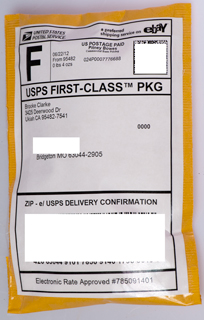
Starting in June 2011 PayPal has a feature that allows printing a
label, in a manner very similar to the USPS printing of labels,
except it can be for first class postage whereas the USPS does not
allow that. The PayPal version also fills out all the
information so you don't need to type it in manually. So I
can ship domestic first class packages (>3/4" thick) without
using stamps. This eliminates the hassle of finding the
correct stamps and of keeping up on the rate changes.
USPS First-Class Package Label 5" x 7" mailer
International First Class Label with
Postage & Customs Form
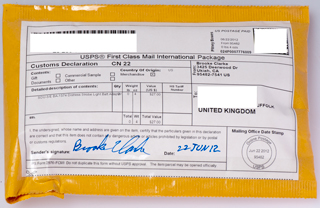
Starting 22 June 2012 it's also possible to print a combined
customs form and label with postage for international shipments
using eBay. This saves standing in line at the post office.
There's a bug in that you can NOT print the international label
using a Post Script printer driver, but can do it using the PCL
printer driver. The problem is not related to the brand of
browser.
There's also a minor bug you can see in the photo below where the
item description starts a few spaces to the right of where it
should and so overlaps the Qty number in the next column.
This new label printing system is also being used for domestic
labels and now when multiple items are ordered it gets the total
weight correct, unlike the prior PayPal version that didn't seem
to pay attention to the quantity of parts ordered. The normal
shipping time with the green customs form is just over a week.
Note: This only works with eBay shipping, NOT with PayPal
shipping. July 2012.
USPS First Class International Package 5" x 7" mailer
It's still not possible to print the
label needed to ship a CD-ROM as of 22 June 2012 as far as I know.
What can be Printed
You can print a label that includes
postage. These need to be printed just before use and can
only be used for postage for the intended parcel. A newer
development where you print your own stamps that can be used
anywhere a stamp would be used. These are called NetStamps,
InstaPostage, etc. They can be printed on almost any printer
usually from special preprinted sheets of peel off blank
stamps. You must get these from a USPS approved vendor since
they contain special inks and fluorescent marks. You can
print either a small plain stamp or a double wide stamp that
contains a photo (which needs prior approval).
Mailing Systems
Mailing systems typically consist of
a scale linked to either a stand alone printer or a computer with
attached printer. The idea is that they have the rate
schedule for the USPS and some also for UPS, Fedex, DHL, etc. so
you can ship whatever it is and print the labels and
postage. Some of the low cost systems mentioned here include
a small scale.
Advantages of Printing your Own Postage
The USPS has some perks.
- A preprinted mailing label that includes the machine
readable codes per USPS specs allows getting free delivery
confirmation on some mail services. This can be done
using the software tools supplied by eBay or PayPal for
example at no charge. But this requires getting the
address information into your computer. For a small
operation that means hand typing, but for large operations
they may have order procession software that prints the all
the shipping doucments.
- When using metered postage you can ship items weighing over
1 pound which you would otherwise need to take to the post
office. This is because the USPS has confidence in the
accuracy of the scales used by the mailing systems. This
can save trips to the post office and which is expensive both
in terms of time and also gasoline.
- It's much more convient and time saving to place a single
preprinted stamp on a parcel than to put on 3 different value
stamps.
- Cleaner appearance. Using a preprinted stamp looks
better than a bunch of stamps.
- Advertizing can be done using the photo stamps, but at a
price. A lower cost alternative would be to use an ink
pad type stamp and/or use custom printed packing tape.
USPS Rules
There are USPS rules (
604c,
024)
about
how Postage Meters and PC Postage Systems will operate. The
DMM
index lists a bunch of these. For example Dymo is not
an authorized provider so they use Endicia who is a licensed
provider as the supplier of the special blank labels.
Only three companies are listed for PC Postage in 604c:
Pitney Bowes Inc., Endicia.com (PSI Systems) and
Stamps.com.
Vendors
Pitney has been in the postage
meter business it seems forever. They answered the support
phone number with no waiting. This on 17 May just after
the USPS rate changes! A #1 for support.
753207
Mail-Marking Machine, A. H. Pitney, Feb 23, 1904,
101/91
; 101/236; 101/352.08; 101/367; 101/77; 235/101 - a machine not
much bigger than a typewriter that can be used at a table or
desk to print postage on envelops on the premises of a
business. The start of the Pitney Bowes business.
This is a thermal roll printer
used with your computer that can print either a plain stamp or a
double wide stamp that has a pre approved photo. They say
it's a 24 hour email process to get a photo approved.
This PB printer can be used when connected to a computer or can
be setup from the computer then used in stand alone mode.
In stand alone mode there are 3 buttons that can be pre loaded
with the value of the stamps (which much be prepaid and
downloaded) and 2 buttons to select a photo image (200x225 pixel
jpg).
About 200 plain stamps (7.5¢) or 100 photo stamps (15 ¢) per $15
roll.
This is a stand alone ink type
printer that can print on up to 1/4" think envelopes or Avery
type labels. It comes with a 5 pound scale that's linked
to the printer. No computer needed. But an analog
telephone line is needed to load postage into the printer.
An internet based company offering
shipping lable and stamp printing using your computer and
printer. They claim lower costs than the conventional PB
postage meters and cost savings in time spent at the post office
in lines.
Blank stamps are $30/500 roll (6 ¢) or $4/125 sht ( 3.2 ¢).
19 May 2007 - Ordered some blank stamps so I can print $1.30
stamps.
25 Jun 2007 - ordered the 5 pound scale from Stamps.com. You
need to wait 30 days prior toplacing this order, that way
you need to pay the first month's fee.
See a photo of the 5 pound scale on my
Measuring Length and weight web
page.
22 Aug 2007 - 14 oz package returned with 3 stickers,
conflicting reasons why. Have question at USPS awating
answer. Package was mailed in my home box using Stamps.com
stamp (not label) and addressed to an APO box.
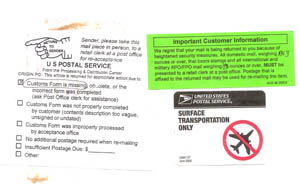
1) The left label was scotch tapped over the others and says
"Customs Form is Missing". Does this mean a Customs form is
needed for APO boxes?
2) the green peelable sticker says you must personally present
packages overe 13 oz at a post office.
3) the Surface Transportation Only sticker seems to say that first
class is no longer air mail?????
23 Aug 2007 - The answer from the San Francisco USPS office is
that:
1 Missing Customs Form) This is the problem. All
APO/FPO box numbers are considered international and need the
customs from.
2 Green Sticker) "PC postage" is exempt from the 13 ounce
rule relating to posting somewhere else besides a post office,
like in my mail box or a drop box. So the Stamps.com
stamp (which is PC Postage) is OK. This sticker is in error.
3 Surface Not Air) This sticker is just reminding postal workers
that APO or FPO mail is not first class and to send it by slow
freighter (not very patriotic).
Scheduled Shipping Delays
17 July 2007 - Scale still not here. On 12 July I phoned in
to ask about it and the person said they would enter the items I
was eligible for: the scale and a $10 credit. But from
southern to northern California it only takes a couple of
days. It's interesting that they used Fedex ground to
deliver the scale and not the post office. Also
interesting that Fedex has been sitting on the box in the San
Pablo center for almost a full day. I've seen this before
where it looks like a package could be delivered a few days
earlier and they sit on the package and deliver it at the end of
the possible span time. Don't know if it's a way for Fedex
to balance their work load, or if it's a service to delay the
package.
The coupons are not immediately redeemable, but only one per
month. This way you must pay the monthly fee (charged to you
credit card) so it's more like a discount than a gift. I
also have the feeling they they "loose" your post card requesting
the gifts and thus get more monthly payments. When you call
their phone number one of the menu choices is to cancel the
service.
19 July 2007 - It's now very clear that there is a delay in
shipping system.
I called the Smart Post phone and got an answering machine.
Who knows if or when they'll call back.
| July 19, 2007 |
10:11 AM |
Sortation Center
Departure |
SAN
PABLO,
CA |
| July 14, 2007 |
12:21 PM |
Sortation Center Arrival |
SAN
PABLO,
CA |
The scale was
shipped
on
July 13 and arrived a day later at the Fedex San Pablo
center. It sat there for 5 days, and today (Thursday) was
shipped out.
It's scheduled to be here 23 July (Monday). A USPS package
will get to or from me to southern California in a day or
two.
The scale was shipped by
Fedex
Smart
Post. This is a bulk mail service. Their main
claim is faster delivery for lower rates. But in order to
offer the shipper a lower price than USPS, Smart Post sorts the
packages and sends them to a "sortation center" where they sit as
long as it takes to accumulate a full truck load going to the same
USPS Bulk Mail Center. I've seen a number of complaints from
people who have had problems with late delivery or lost parcels
where the USPS and Smart Post point to the other guy.
It's interesting the email notification says the package was
shipped via USPS, but that's only half true.
U.S. Patent Nos.:
5510992
System
and
method for automatically printing postage on mail, Kara; Salim G.,
Post N Mail, April 23, 1996, 705/408 ; 235/380; 235/381; 380/51
-uses a touch memory utility ("TMU") button to transfer postage
from post office to computer - n.a. for the stamps.com system
5682318
System
and
method for storing postage in a computer system, Kara; Salim G.,
E-Stamp Corporation, 705/402 ; 235/380; 235/381; 235/382 - uses
general purpose computer
5717597
System
and method for printing personalized postage indicia on greeting
cards, Kara; Salim G., E-Stamp Corporation, 705/408 ; 700/231;
700/232; 700/233; 700/235; 705/410
5801944
System
and method for printing postage indicia directly on documents,
Kara; Salim G., E-Stamp Corporation, 705/401 ; 700/231; 700/232;
700/233; 700/235; 705/408; 705/411
5812991
System
and method for retrieving postage credit contained within a
portable memory over a computer network, Kara; Salim G., E-Stamp
Corporation, 705/410 ; 235/375; 340/5.92
6208980
System
and
method for printing multiple postage indicia, Kara; Salim G.,
E-Stamp Corporation, 705/408 ; 101/71; 283/71; 380/51; 380/55;
700/235; 705/410
6249777
System and method for remote postage metering, Kara; Salim G.,
E-Stamp Corporation, June 19, 2001, 705/404 ; 705/401; 705/60;
705/62
Dymo has been making label
machines for many years. The narrow roll type have been
used for printing address and return labels for some time.
A modern extension if to now print postage stamps.
This system is based on the existing Dymo LabelWriter 400 Turbo
which is a thermal printer so no ink, toner or cartridges needed,
but it uses a thermal paper or plastic for labels and for stamps
uses a very special USPS approved blank stamp paper. No
monthly fees. $ 16/200 roll (8 ¢)
They have a number of
postage
plans based on your computer and printer using their blank
stamp sheets or rolls.
$16/200 roll (8 ¢) or $4/125 sht ( 3.2 ¢) 17 May 2007 sheets out
of stock.
20 photo stamps per 8.5" x 5.5"
sheet (I'm guessing 1.5" x 2.25" for each photo stamp).
$ 17.95 for one sheet including 41 cents for mailing a first
class envelope ($9.75 for the blank stamps or 49 cents for each
blank stamp). Other prices for use on post cards or other
postage amounts. Because of the indluded postage not
suitable as a general purpose stamp printer.
Print postage for all
package
and first class mailing services.
InstaPostage
is their stamp printing that's part of the standard plan.
These stamps can be prined on very special sheets in your
printer or from very special rolls in a Dymo label printer.
Note that Endicia is the company that sells the labels needed
for the DymoStamps system. You do NOT need to join the
Endicia plan to buy the labels for the Dymo turbo 400
printer. $ 16/200 roll (8 ¢)
The USPS offers a free
service that allows you to print a label with
postage. You use your charge card to pay for the
postage.
Advantages
- No monthly fee
- No special paper or ink needed. Uses your
computer printer on a sheet of 8.5 x 11 paper.
- The 13 ounce limit for stamps does not
apply. For example you can ship a 10 pound box
from your home or business.
- The USPS will come and collect your package (no
need to drive to the post office and stand in line)
Disadvantages
- The software has bugs
- Can not use for first class mail, only Priority or
Express mail
- Can not use to print stamps, only a label with
postage
- Uses the top half of an 8½ x 11 sheet for the
label and the bottom half for your receipt
- Takes some time on the computer. Each of the
below items is a new web page.
- sign -in
- To Address
- Priority, Flat Rate, Express, etc
- Shopping Cart
- Billing
- Pay & Print
- Print Verification
- Windows Printer choice and setup
- Printable receipt
Took about 8 minutes. Would be faster if
multiple items were done toghther.
To access Click-N-Ship
Depending on how
you have the security options set in Windows XP you
may need to add the
following trusted sites into IE.
If you get a bunch of Java errors you need to do
this.
Tools\Internet Options\Security\Trusted Sites\Sites
- enter and add:
https://ecap-ws-prod.usps.com
https://ecap21.usps.com
https://sss-web.usps.com
You can access the Click-N-Ship page from the main
USPS page by clicking on "Print a Label" or if you
have computed the postage in the table with the
price for the different services there is a link to
the right of the price that says "Print a Label"
which means print a label with postage.
If you put a value in the box that means you
want insurance in that amount. So if you don't
want insurance don't put a value in the box.
Near the end of the process there's a check box for
Schedule a pickup and the USPS will come and collect
your parcel.
|
At the USPS home page along the top edge there are links for:
Find a Zip Code,
Calculate Postage,
Print a Shipping Label,
Schedule a Pickup,
Locate a Post Office,
Track & Confirm.
So
it's clear from these links that the USPS does not offer postage
printing. But that's not the case. The link to
"Print a Shipping Label" does not send you to a web page about
the
Shipping Assistant PC download
application for printing labels without postage, but instead
takes you to the Clik-N-Ship web page about printing postage and
a label. If you have URL display turned on in your browser
you can see the link for
Print a Shipping Label is:
http://www.usps.com/shipping/label.htm?from=home&page=printpostage
so
internally
this is called PRINT POSTAGE, yet that's not what they tell
you. This is sloppy. The USPS is like many
businesses not clear about what they are doing. If they
were a large publicly traded company with stock I'd be tempted
to sell them short.
The USPS has their own service, good for both domestic and
international, Priority and Express mail, but neither First
Class postage, nor stamps.
When you use the USPS rate calculator on the web page showing
the rates for the different options, those options for Priority
and Express mail have a link on the right saying "Print Postage"
that leads to the Click-N-Ship page (same as link in the title
of this paragraph). Here you can go to a page to register.
I've tried three times to register today and on all three
occasions have met with java errors. My one phone call ,
after being forwarded to web tech support, was someone how told
me what happened could not happen, i.e. that I used my email
address as my user name. So after the call retraced my
steps and got the same error, which I emailed to the USPS.
This after noon I really wanted to sign up for this service so
picked a user name that's all letters. I don't know if
it's an identical
error
message, but it's a
bunch of
java errors.
So for now I can't say much about this service except it seems
to have fatal bugs.
Yet, I've yet to find anything resembling technical
support for Click-N-Ship.
The reason for the Java errors may
be because you need to add the following trusted sites into
IE.
Tools\Internet Options\Security\Trusted Sites\Sites - enter
and add:
https://ecap-ws-prod.usps.com
https://ecap21.usps.com
https://sss-web.usps.com
After printing a Click-N-Ship label some comments.
1) It takes a full 8.5x11" sheet of paper for 1 label. A
huge waste of paper!
Note that the Stamps.com stamp
sheets have 25 stamps on each sheet and the printing
application is setup with a page preview so you can print just
the number of stamps you want. This means running the
sheet through the printer up to 25 times and is not a
problem. So there's no reason for the Click-N-Ship
system to work the way it does. Avery has a large number
of mailing labels, many of which would easily work for this
application and provide many more lables per sheet.
2) If you goto the USPS web page for "The Postal Store" and
search on Click_N-Ship there is only one item:
Click-N-Ship
Self-Adhesive
Labels - 25 June 2007 - they don't have any
Item #
841578
|
| Click-N-Ship Self-Adhesive
Labels |
|
| Price: $9.00 |
|
Note you get 25 sheets, i.e. 25 lables for $ 9.00 which is 36
cents per label.
Label Universe will sell you 25 sheets of their "
LUPOSTSLW10"
stick on lables for $ 6.90 (just under 28 cents/label).
But if you use Click-N-Ship it always takes a full 8.5x11"
sheet for each label.
23 May 2007 - The reply from USPS was that IE is not supported
and to use Netscape or Firefox. I tried Netscape 8.1 and
was able to register and get to the page where it has your
return address info and you can fill out the To address.
Also there's a Batch Shipping mode if you are going to ship the
same parcel to a number of different recipients.
Strike # 1.
24 May 2007 - letters sent to Thompson, Fienstein, Boxer and
Thompson since Congress oversees the postal service.
25 May 2007 - have a package that would be a good test of the
Click-N-Ship. Tried to use IE6 but got error
message. Tried Netscape 8.1 and also got the same:
"
We encountered the
following error while processing your label(s):
Error- We
are sorry but an unexpected error has occurred during the
checkout process. Please try again later." error
message.
Strike # 2.
3 June 2007 - It's been 9 days since I sent the email message
about not being able to print and still no response.
5 June 2007 - got a call from Mr. Moore who runs the local
post office responding to the letter to Thompson.
- He likes delivering the mail to the group of boxes that's
about half a mile from my house and doesn't want to let me
have the box in front of my house. Someone else in the
local post office had told me that I needed "an act of
congress" to get the box moved and now I see that's the
case. There are no postal regulations, no appeal, it's
entirely up to what he wants to do.
- He admits that it takes at least 3 stamps to get $1.30 in
postage. Pushed the automated machine in the post
office that prints labels with postage, but that's not
viable for my business needs.
- said he would look into Clip-N-Ship not working and no
tech support. I.e. still have received no response (10
days) on my email query of 25 May.
6 June 2007 no word from USPS as to why Click-N-Ship does not
work.
about 18 June 2007 - was able to print a Click-N-Ship label on
plain 8.5x11" paper. Half of the page is the actual lable,
so this can only be used on good sized packages, not on smaller
items. The other half of the page is the receipt.
Seems like a huge waste of paper.
about 20 June 2007 - Around 11 am woman from the USPS
called about my Java script errors and said something about my
computer's Java configuration and was willing to help right
then. But I was very busy and asked her to call back after
2 pm. She never called back. It's now 25 June 2007
and I haven't heard anything.
28 June 2007 - The
USPS page
that defines first class letters as being a minimum of
3.5x5" and a max of 6.125x11.5". The thickness is 0.007 min to
1/4" max. Therefor my CD-ROM mailer at 5.5 x 5.5 x
0.112" meets these rules. Ah, here are the "other"
rules:
- It is a square letter
- It is too rigid – does not bend easily
- It has clasps, string, buttons, or similar closure devices
- It has an address parallel to the shorter dimension of the
letter
- It contains items such as pens that cause the surface to
be uneven
- The length divided by height is less than 1.3 or more than
2.5 (calculate this below)
What they are trying to get at is you need to pay more (17¢) if
the letter does not work in their current sorting
machines. But the rules as stated are not very well
thought out.
For example the first and last rules are really the same thing
and the first one should just be eliminated or made into an
example for the last one. This is related to the address
being parallel to the long dimension or not. In my opinion
they need to fix the machine so it works with the address either
way. I can understand the technology 10 or 20 years ago
requiring the address be in a small rectangle in a know
orientation, but those days are long gone.
The uneven surface causes the current machines problems.
Again in my opinion they need to improve the machines.
The "too rigid" rule has no meaning. There's no way to
determine if an item meets the rule or does not meet it.
Either they eliminate the rule or replace it with something that
can be used. The airlines came up with a rule for the size
of carry on luggage that had wording something like if it can be
compressed to fit . . , but the test was the box that you needed
to get you bag to go through. So if they can't come up
with a rule that has meaning then they need to describe a
testing machine that can be used.
So the problem with my CD-ROM mailer is that it's square.
I can fix that by getting a rectangular envelope. But it's
impossible to comply with the "too rigid" rule because it's
undefined. I.e. it's whatever they say it is.
28 June 2007 - Senator Mike Thompson's office called to follow
up on the letter that I sent him and to confirm that the USPS
had sent me a letter.
I explained the that letter and call from the local guy did not
at all satisfy me.
The more I look at the USPS the worse they get. I don't
claim to be a sooth-sayer or fortune teller. But I can
look at the current state of affairs and extrapolate into the
near future. It's clear to me that a home computer can
print either an envelope or any standard Avery mailing label
with not only the from and to addresses but also with a postage
paid symbol. This does not require any special inks or the
expense of safeguarding stamps.
19 June 2007 - Senator Dianne Feinstein sent an email
giving me the postal address for the post master. I'm
working on a letter to him now.
Have not heard anything from Senator Barbara Boxer's office.
The
Honorable John
E.
Potter
Postmaster General
U.S. Postal Service
475 L'Enfant Plaza, SW
Washington, D.C.
there was no email address included.
11 July 2007 - when trying to Click-N-Ship a priority
label w/postage encountered "Invalid Address" error when
using an address that if written by hand would have no
problems. No clue as the the problem or in which box
it was located. I guessed that the building number
could not be on the same line as the street name and moved
it to line 2 and that fixed the problem. The largest
face of this parcel is 5.5 x 4.5" so the 8.5x5.5 label
will need to be wrapped around the box, keeping the bar
code flat.
30 July 2007 - A man from the San Francisco USPS office
called to confirm that my concerns have been
satisified. NOT.
He said he would look into:
- Why IE is not supported and why the women did not call
back after 2 pm about the Java issue - a ladywill call
- What the regulations are concerning mailbox in front of
house - he will get back to me
The reason for the Java errors may be
because you need to add the following trusted sites into IE.
Tools\Internet Options\Security\Trusted Sites\Sites - enter
and add:
https://ecap-ws-prod.usps.com
https://ecap21.usps.com
https://sss-web.usps.com
The lady who phoned could not give me anything concrete about
what "It is too rigid – does not bend easily" means in
regards to a CD and said she would email me some information.
Also mentioned that there's a new rule about parcels over 13
ounces.
29 Dec 2007 - tried to use Click-N-Ship and again got an error
message. A few weeks ago I called the USPS and complained
about this problem and they person that answered was supposed to
call Hawaii USPS to ask about the address and call me
back. Haven't heard anything. The error
message looks like:
|
 |
 |
|
|
|
|
We're sorry! We were
unable to process your request. Please correct the
error(s) indicated below: |
|
You have entered a
non-deliverable Delivery Address. Please verify
address, including apartment, suite, etc. Additional
assistance is available at Find
ZIP Codes. |
All the
* fields were filled in
based on the address provided by my customer and I have no doubt
that the package will be delivered, but it's going to cost a
drive to the post office and standing in line. They claim
a non-deliverable Delivery Address, yet the package gets
delivered, so the Click-N-Ship software has serious problems.
4 Feb 2008 - After one of the above We're sorry! error messages
I phoned USPS and found the problem for this one. It was
how the address is divided between the lines.
For example the number and street name are on a line and after
that the suite or box number, THIS IS NOT ALLOWED. The
suite or mail station, etc. number needs to be on the next line
down.
5 Feb 2008 - Patricia called in response to my letter to the
Postmaster General and my congress man and women. She says
there is a 90 and 40 cent stamps that add to $ 1.30. Also
gave me the name and phone number of a Mail Design specialist
who was very knowledgable about DVD mailers. I need to do
some homwork on that.
More to come.
7 Feb 2--7 - received an email pointing out the Click-N-Ship
does NOT conform the from address. I.e. if you make an
error inputting your own address and the package needs to
come back to you, it may never happen. It would be so
simple to use the same programming code to check both
addresses. But the down side is that doubles the chance of
the program saying your address is no good.
Here's a number you will not find on the USPS web page:
|
Click-N-Ship Phone
Support
800-344-7779
Internet Customer Care
Click-N-Ship = 2
[part of on hold message:
icustomercare@USPS.com <- not
.gov
Technical support is available
seven days a week from 7:00 a.m. to 11:00 p.m. EST at
the number below:
1-800-344-7779
|
I gave up waiting after 15 minutes on hold.
In the outgoing message they give an email address for support,
but with a .com address, not a .gov. Is that another
problem or do they mean it?
2 days later I got a response to my email with the .com to
address with the hours for phone support shown above.
Also it sounds like she is saying "we are experiencing an normal
call volume . . . . " or maybe that's just my imagination.
DVD CD-ROM Mailers
The existing square single layer
cardboard (not corrugated) mailers are not machinable for two
reasons. One they are square and that's not allowed
since the addresses need to be aligned parallel to the long
axis (a square has no long axis). That could be fixed
simply by gluing on an extension. But the real problem
is the flexibility of the mailing piece.
The mail piece conveyor makes turns using an eleven inch
diameter drum and the belt tension is forty pounds. If
the mail piece sticks up instead of following the drum it can
jam the machine, break the mail piece or cause other problems.
It's not that the CD-ROM or DVD is too stiff (although there
may be some that are) it's that the cardboard mailer is very
stiff.
Netflix is THE company doing mail based DVD rental. The
USPS does seperate sorting for Netflix returns and the return
time is very fast. For example if I put the mailer in
the USPS drop box before noon, Neflix receives the DVD about 6
am the next morning.
Patents
6612484 Duplex Envelope, (NCR), Sep 2 2003, 229/305 -
aimed at billing and payment
6951279 System and Appartatus for Protecting Digital Media,
(Gamefly), Oct 4 2005 - allows user to return DVD/CD in same
package, but may not be machinable, 206/313, 229/305, 229/306, 229/313
7469816 Digital media mailer, (Pitney Bowes), Dec 30 2008, 229/303
; 229/304; 229/305; 229/71
D536375 Disc Mailer, (USPS), Feb 6 2007, D19/3 - might
be a single use machinable DVD/CD mailer.
USPS 13 Ounce Rule
New
13-Ounce
Mail Rule to Take Effect July 30 - you can not use
stamps for postage over 13 ounces unless the parcel is taken
to a post office counter. This used to be 16 ounces
which was the limit for low cost postal scales.
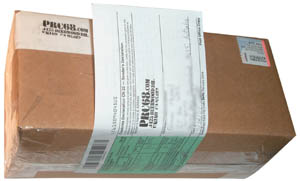
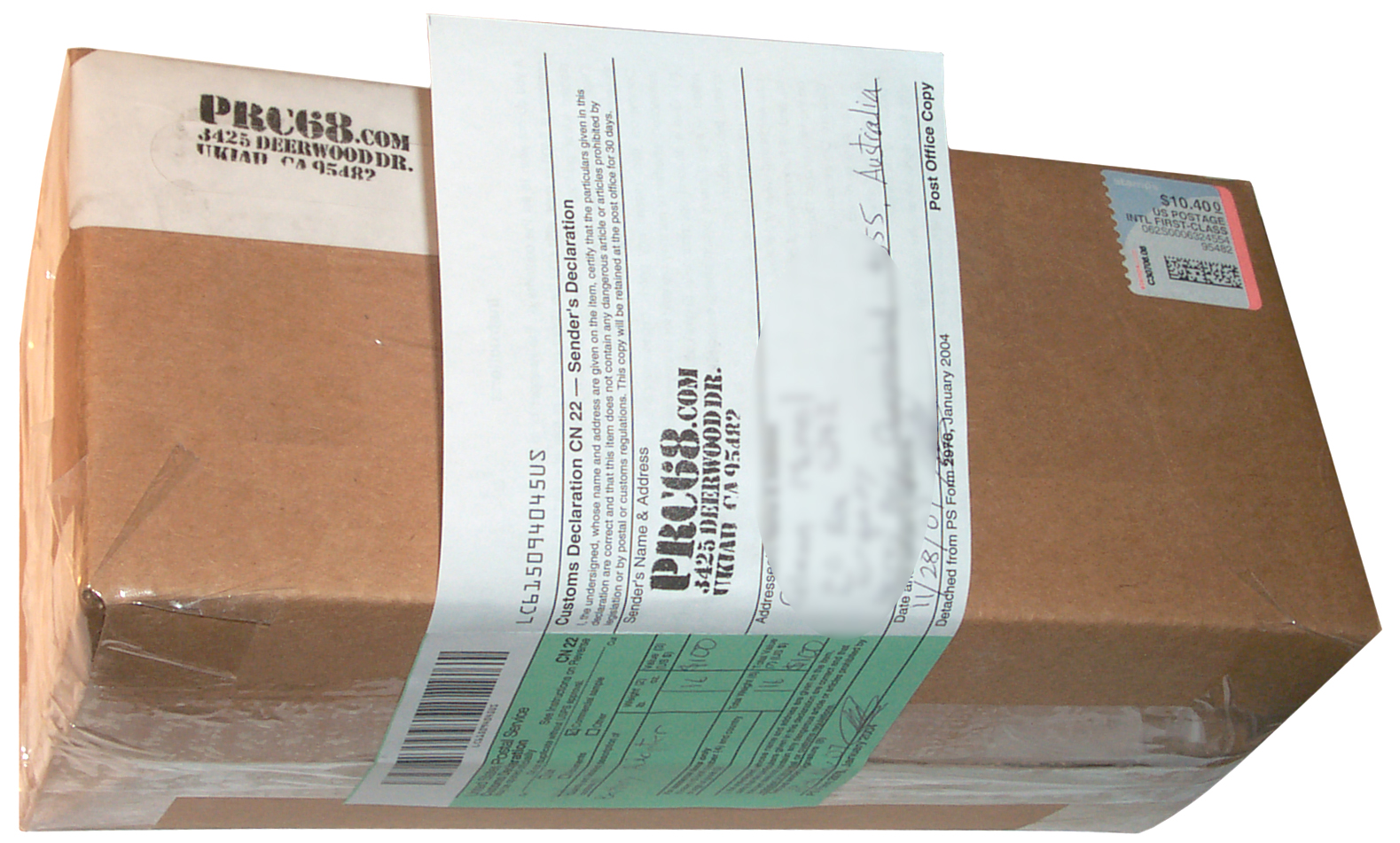
28 Nov 2007 - This is a one pound box headed for
Australia. It's in my household mail box with the red
flag up. The postman will pickup and deliver it.
Note this requires Stamps.com or an extra $9 to use the USPS
Priority Mail print a label with postage.
25 Nov 2007 - Ebay gets
it wrong. Both the on line eBay listing
software and the run on your computer Turbo Lister software
prohibit using first class mail for packages over 13
ounces. THIS IS NOT WHAT THE NEW RULE SAYS! It
just says you can't use stamps for packages over 13
oz. This may explain the high shipping fees I've noticed
recently on eBay. The sellers are being forced to use
higher priced methods.
13 Aug 2007 - Tried to print a label w/postage and got error
message saying something was wrong with address. Double
checked ZIP using USPS lookup and it was OK. Tried leaving
the ZIP box empty since the program should standardize the
address. Emailed to my customer to confirm the ship to
address and it came back exactly like what I had entered.
There's no clue given as to what's wrong.
Flat Rate Boxes
The USPS offers a couple of Flat Rate Boxes. As the words
say you pay a flat rate of $8.95 for either box no matter what
it weighs.
Table of Boxes (Feb 2009)
|
Model
|
Name
|
L x W x H"
|
$
U.S.
Max Wt
|
$
Canada
Mexico
Max Wt
|
$
Other
Countries
Max Wt
|

|
|
Small
Flat Rate Box
|
5-3/8” x 8-5/8” x 1-5/8” |
$4.95
70 #
|
$10.95
4 #
|
$12.95
4 #
|

|
|
Priority Mail Large Flat Rate Box
|
12” x 12” x 5-1/2” |
$13.95
999 #
|
$32.95
20 #
|
$53.95
20 #
|
|
|
Priority Mail APO/FPO Flat Rate Box
(same as Priority
Mail Large Flat Rate Box)
Requires customs form
|
12” x 12” x 5-1/2” |
$11.95
999 #
|

|
O-FRB-1
|
Priority Mail Box Flat Rate Box |
11" X 8.5" X 5.5" |
$10.35
20 #
|
$25.95
20 #
|
$41.95
20 #
|
 |
O-FRB-2
|
Priority Mail Box Flat Rate Box |
11-7/8" x 3-3/8" x 13-5/8" |
$10.35
20 #
|
$25.95
20 #
|
$41.95
20 #
|
 |
|
Shoe
Box
|
7-1/2"
x 5-1/8" x 14-3/8"
|
$ depends on destination and weight |

|
|
Express Mail Box |
5
1/4" x 12 3/8" x 3" |
$ depends on destination and weight
|
You can get the boxes free at the post office or order them on
line and they will be delivered for free. These can be
used in a number of ways. If it's for personnel use and
you're not filling it with lead your local postman may (at his
option) collect the box with your other outgoing mail.
If you are a business and have a bunch of these filled with
metal the local postman probably will not collect
them. You can call the local post office and
schedule a pickup at which time you will need to pay $13.95 for
the trip. BUT, if you use Click-N-Ship to print the label
with postage then the program has a provision to schedule a free
pickup.
Another postal employee told me that they don't charge for
pickups.
WANTED
The first priority is to fix
Click-N Ship. When it's fixed then:
The USPS should allow Click-N-Ship
on all service levels, not just Priority and Express. Note
that Click-N-Ship is only for printing labels with both the
return and destination addresses, NOT stamps which require a
higher level of security. They also need to get the label
size much smaller than it is now.
The USPS also has a PC download
application for just label printing (NO POSTAGE) called Shipping
Assistant. The pdf manual is 198 pages and looks as if it
was written by a high school dropout. No Adobe navigation
features other than links to USPS web pages and email
addresses. For more on Acrobat navigation see my web page
on how to
make a pdf document.
It has it's own phone support number. I get the feeling
that the USPS is just starting on this voyage and is learning as
they go.
I was hoping that Shipping Assistant would offer more than
Click-N-Ship since it requires not only that it be installed on
a PC but also there's a registration process. After all
that work you would think that Shipping Assistant would allow
you to print labels for any class of mail with the
postage. But NO . . . it has less capability
than the on line Click-N-Ship application in terms of postage
printing.
I think if you asked many people that work at the USPS they
would say that there's a huge benefit to them of having machine
readable labels on the items they process. So if people
use Shipping Assistant it helps the USPS. But the latest
postage rate increases coupled with the high gasoline prices
means the average guy needs to not stand in a line at the post
office. Shipping Assistant needs to be changed to allow
printing postage on any label.
USPS Service Center with Scales
& postage printer
CAUTION - Unlike the USPS on line label
printer, the eBay label printer and the PayPal label printer,
this is just a stamp printer. That's to say it only prints
what amounts to a stamp and you need to manually enter the
from and to addresses. (don't ask how I learned this).
This will NOT work for international mail, only domestic.
Fedex Smart Post (Really Dumb Post)
The
real problem is that
the shippers are secretive about using Smart Post
and pretend they are shipping via USPS or Fedex.
My first experience with Fedex Smart
Post was the postage scale sent by Stamps.com. See Scheduled
Shipping Delays
above. The rate must be
lower for fulfillment shippers but it comes at a very high price
for the recipient in terms of shipping delay.
10 Oct 2007 - I ordered a couple of items from Harbor Freight
on 2 Oct 2007 and in the confirmation email they said :
"your order will be sent via HFT Shipping".
I usually receive packages from Southern California in two days
independent of how they are shipped. BUT NOT THIS TIME.
I went to the Harbor Freight web page for
order
status to see what happened to my order. After entering my
order number and zip code the next page shows:
| Ship
Date: |
10/03/07 |
| Ship
Method: |
Parcel
Post |
But that's only half a lie. Now clicking on the link for Carton
number brings up a Fedex (not USPS Parcel Post) hosted web page
with a tracking number. The message on this page is:
No information for the following
shipments has been received by our system yet. Please try
again later or contact Customer
Service. |
|
|
Clicking on the Customer Service link takes you to the general
Fedex customer service web page where there's a link for
Not sure
which FedEx company to contact? Clicking on this link
launches a new web page that mentions Express, Ground, Freight and
Custom Critical, but NOT Dumb Post. Below is the tracking number
obtained on separate cycles through the Harbor Freight web pages
to be sure it's what Harbor Freight says it is.
9102128212385026047043
9102128212385026047043
11 Oct 2007 - calling Fedex they say it's not their tracking
number. Get their tracking number and call back.
Harbor Freight - says shipped wed oct 3 2007 it will take "10 to
14 days".
Escalating call to supervisor. . . . waiting on hold. 8:39
am 8:40 . 8:41
Wanda Boatwright Harbor Freight -
web states 10 to 14 days for standard delivery.
Under 8 pounds goes Smart Post.
she will track my package on smart post. placed me on hold 8:52
8:53. .
10/13 scheduled delivery. from Fedex Smart Post. (that's 10 days
instead of 2 if it gets here then)
The Fedex person was supposed to know it was Smart Post.
Harbor freight standard (Dumb Post) $ 7.99, but if expedited
service (UPS ground lowest cost option) was requested it would
have cost $12 or for $5 the delivery time would be shortened to 2
days for me.
There is a
Smart
Post Tracking web page but it can only be accessed by the
shipper, not by the recipient of the package. This may be how
Wanda was able to tell me the scheduled delivery date.
Fedex - Ruth Tarbutton - "Invalid check digit" - she says if the
number was SmartPost their computer would say so. There's
something wrong with the number. I copy and pasted the number
above to confirm and it's exactly the same number. So the number
that Harbor Freight is feeding the Fedex system is NOT their
tracking number. It looks like Harbor Freight has a problem with
posting the wrong tracking number. It's not clear what the normal
Fedex tracking web page will do when given a SmartPost tracking
number.
Harbor Freight -Sherry ask for -> Wanda Boatwright - 9:21 am
Sherry took my name & number and said Wanda would call back.
9:22 . . . . . . . . . . never happened
Pricing
There are three costs involved, one
is the up front cost to get started, then there is the monthly fee
and finally the cost of supplies for each stamp. So which
vendor is the best for you depends on how many stamps you use in a
year. At high volumes the up front costs and monthly fees
are not too important, but the cost per stamp becomes very
important. This is where you get into the traditional ink
based postage meter type of operation.
The other factor is what benefit you get from the overall service
package offered. That's hard to evaluate without
using. Most of these plans have a month trial period so you
can try them out.
Printer
Some systems require a special printer that you need to buy up
front. For others you just use your regular sheet printer.
Ink
Most of the PB postage meters use a very special USPS specified
ink that may appear to be pricey. The way to look at
the ink is how many cents per stamp since it replaces the peel off
forms you need to buy from the other vendors. The special
ink is going to be on any stamp not printed by the USPS either on
a preprinted form or as the raw ink. For high volume mailers
it's much lower in cost to work with the ink and apply it to their
mailing pieces.
7192474
IR absorbing photosensitive optically variable ink compositions
and process, Pitney Bowes Inc. (Stamford, CT), March 20, 2007,
106/31.32 ; 106/31.28; 106/31.64 - There are
over
7,000
patents relating to ink.
4567370
Authentication device,
James
J. Falls,
Baird
Corp, 1986-01-28, - UV illumination, Visible and
IR glow.
Blank Stamps
This might be special peel off sheets for use in your printer,
special rolls for use in Dymo or other label type printers or can
be plain Avery type lables if a specalized ink type stamp printer
is used. Note that the cost of these blank stamps can vary
between 1 and 50 ¢ each. You need to pay for the
actual postage in addition.
Monthly Fee
Most plans also have a monthly fee. These vary a lot for the
same service depending on where and how you ask. Plans with
no monthly fee seem to charge more for the blank stamps.
These are open to negotiation. The lowest price comes from
talking on the phone to the key vendor, not from an office supply
store or from the vendors web page.
To compare the above services let's
say that I'm going to mail 1,000
5BA Battery Adapters
in the next year. I'm going to do more that just that but
it's a place to start.
|
PB StampExp
|
PB
PersPost
|
Stamps.com
|
Dymo
|
Endicia Std
Pln
|
|
|
|
Getting
Started
Guide
|
|
|
Scale
|
n.a.
|
5#
|
5#
included
|
n.a.
|
25#
optional
|
Printer
|
PB
special thermal
|
PB
special ink
|
your
sheet or Dymo
|
129.95
|
your
sheet or Dymo
|
Ink
|
n.a.
|
$40/600
stamps
|
n.a.
|
n.a.
|
n.a.
|
Blank
Stamps
|
$15/200
roll (7.5¢)
100/roll w/photo
|
minimal |
$30/500
roll
(3.2¢)
$4/125 sht (3.2¢) |
$16/200
roll (8¢)
|
$16/200
roll (8¢)
|
Mo Fee
|
$8/mo no
contract
|
$10/mo
contract
|
$8/mo no
contract
|
Zero
|
10/mo
|
printer
|
$99
|
$40 ink
|
$0
|
$130
|
$0
|
1000
blank stamps
|
$75
|
$5?
|
$32
|
$80
|
$80
|
annual
fee
|
$96
|
120
|
$ 96
|
0
|
$120
|
First
year
|
99 + 75 +
96 = $270*
|
40 + 5 +
120 = $165*
|
32 + 96 =
$128*
|
130 + 80
= $210*
|
$200
|
next year
|
75 + 96 =
$ 171*
|
67 + 5 +
120 = $192*
|
$128*
|
$80*
|
$200
|
First 2
years
|
$441
|
$357
|
$ 256
|
$290
|
$400
|
First 3
years
|
$612
|
$549
|
$384
|
$370
|
$600
|
* - Not including postage which
will be $1,300 for the year.
Conclusion
Pitney Bowes most likely has the
best quality, service and most experience in this business.
They are also the highest priced for low volume businesses.
Endicia could not be reached on the phone (way too busy after the
14 May rate change) so the monthly fee is their list price.
The other monthly fees are what you can get with a little
negotiation. They may have value for someone who ships a lot
of packages, but I'm not seeing it.
Dymo (uses Endicia labels) is the low price leader and if all you
want is to print stamps a good choice. They are at 8 cents
per blank stamp and Stamps.com is at 3.2 cents per blank stamp so
if you look at the annual cost as the number of stamps used goes
up pretty soon Stamps.com is more economical. In addition
Stamps.com is providing a Mailing Service and Dymo is not.
Stamps.com seems to offer the best value for a small business like
mine where the number of stamps used in a year is in the 1,000 to
2,000 area.
Hints & Tips
19 May 2007 - The starter package
arrived this afternoon. On my first attempt to print
NetStamps something went wrong and I stopped the job, but 3 stamps
were misprinted. The problem is that the Stamps.com software
does NOT bring up the normal Windows printer dialog box.
This is a mistake and they should fix it. (25 Jun 2007 - It
may be that they don't want you to print to a file. Which
would allow printing the same pattern again and so have taken
control of that aspect. But it would be easy to print to a
file so I still think it needs to be fixed.) My LaserJet
printer is configured to always use the Duplex printing option and
so prints the second page on the back of the first page.
This cuts paper usage almost in half as well as resulting in half
the number of sheets you need to store. BUT, when duplex is
enabled it changes how the printer works for a single sheet, and
in this case flips top and bottom on NetStamps and causes
envelopes to not get printed at all!
They do have an on line form that gets printed but you need to
address an envelope and mail back to them the defective
stamps. I'll report on how the refund goes. Got an
email on 22 Jun 2007 - took over a month. Saying :
This amount was considered
un-reimbursable by the USPS but has been credited to your account
to thank you for being a valued Stamps.com customer.
With no explanation.
When ordering 4 packs of net stamps (500 blank stamps) the s/h
added $ 4.35 which is about twice the postage.
Quit using Stamps.com because the monthly fee ($15) is too high
for my level of shipping.
When I did have the Stamps.com service I was printing a few sheets
of stamps, say 4 sheets at $1.30 each or $130 worth of
stamps. But it's my understanding now that they have a
limit on the dollar amount of postage you can purchase that's much
lower. So to do the same stamp pinting it takes a number of
cycles through the program making the total cost (including the
time it takes to accomplish) much higher.
Since the rates have increased again to $1.32 I can now order on
line two stamps that have this total. In the future instead
of ordering three or more stamps it may be smarter and lower in
overall cost to just order the next higher total. That means
paying the USPS a penny or two more, but that may be a lower price
than spending a lot of time to save 1¢.
Stamps
For
Sale
I'm thinking of offering stamps for
sale. If you need a strange value stamp I could print and
mail to you in a standard #10 envelope.
Back to Brooke's Home, Products for Sale page
[an error occurred while processing this directive]
Page created 17 May 2007